« May 2004 | Main | July 2004 »

June 29, 2004

Network-enable a series 1 Tivo without opening the box

I have a series 1 Tivo (i.e. a Tivo with only a modem, no USB ports) and, since I moved a few weeks ago, no home phone line. Of course, without a phone line the Tivo has no way to get new TV schedules. As Tivo-addicted as I am, I still am not willing to pay $15 per month to Verizon to keep a phone line around just for the Tivo to use.

There's a kit available to add an ethernet adapter to a Tivo. It only costs $60 (or $120 for the wifi version), but the real cost is in the installation. You have to disassemble the Tivo, extract the hard drive, hook the hard drive up to your computer, download and burn a CD of a specially-hacked Linux distribution, boot that Linux distribution on your computer, mount the Tivo drive, change the config on the drive, and put the Tivo back together. Oh, and I forgot the part where you actually install the adapter, which involves cutting a hole in your case. In other words, it's a day's work, even for someone who has more than a passing acquaintance with Linux and PC internals, and there are a variety of places for things to go wrong.

What was I to do? Pay Verizon? Hack my Tivo? Luckily, there's another way. Series 1 Tivos also have a serial port, and with just a slight change to the dial-up settings (see step 4 here for details), you can tell Tivo to use PPP over serial to download data. So I headed down to Radio Shack (yeah, freakin' Radio Shack!) and bought a null modem adapter, a db9 male-male gender changer (kinky!), and a serial to USB converter, for about $60 ($40 of that was the serial to USB dongle, btw). Putting all of that together along with the serial adapter that came with the Tivo gave me a cable that plugged into the Tivo on one side and my computer's USB port on the other. Then I started PPP on my laptop, which runs Linux, and turned on NAT and IP forwarding. (My PPP setup was inspired by this howto.) And weirdly, it all worked. Tivo was back in action, and I didn't have to touch a screwdriver or torx bit.

For the details on how this was all set up, click to go to the article.

Cable setup

My Tivo comes with a cable that, on one side, has a stereo mini plug and on the other has a DB9 serial plug. The mini plug connects to the Tivo in the back on the port labeled "serial" oddly enough. The other side connects to the null modem adapter plug, which connects to the gender changer (the gender changer looks like 2 female DB9 ports back to back). The other side of the gender changer plugs into the serial to USB converter, and the USB plug on that goes right into the computer.

Tivo setup

Follow the menus: "Messages & Setup", "Recorder & Phone Setup", "Phone Connection", "Change dialing options", "Set dial prefix". Set the dial prefix to ,#219. That was simple, wasn't it?

Computer setup

This setup assumes that your computer runs Linux and whose IP address does not begin 192.168.2. If it does, use 192.168.3 in the instructions below.

As root, run the following commands:

echo 1 > /proc/sys/net/ipv4/ip_forward
/sbin/iptables -A INPUT -i ppp0 -j ACCEPT
/sbin/iptables -A FORWARD -i ppp0 -j ACCEPT
iptables -t nat -A POSTROUTING --source 192.168.2.5 -j MASQUERADE

Now, plug in the cable and tell your Tivo to make a daily call or a test call. When the Tivo tells you it's dialing, run the following command on your computer (still as root):

/usr/sbin/pppd /dev/ttyUSB0 19200 debug proxyarp nocrtscts local noauth xonxoff lcp-echo-failure 2 lcp-echo-interval 60 192.168.2.4:192.168.2.5

If you've got other USB devices attached to your computer or you're not using a serial to USB converter, you'll need to change /dev/ttyUSB0 to be the name of the serial port the Tivo's connected to.

If everything is working, Tivo should tell you it's connecting, and then downloading data. If it doesn't, it might be that your pppd timed out before the Tivo could connect, or perhaps something is messed up with your iptables setup. Sorry I can't be more specific about how to troubleshoot problems. When something goes wrong, I look at /var/log/messages, iptables -L -v -n (to give me packet counters on devices), and I run tcpdump -i ppp0 -l (to tell me what packets are sent to and from the Tivo).

For now, I'm happy starting pppd on my laptop by hand, but eventually I might use mgetty to invoke pppd automatically. I already have to manually plug the Tivo into the laptop (this laptop doesn't just sit next to the TV), so the gain from using mgetty isn't that large. But if anyone works out the right mgetty setup, please leave a comment here!

June 28, 2004

Openbsd upgrade puts customers last

You might have noticed that comments were broken on this blog for the last week or so. That's because of an upgrade at my webhost, Jtan. It seems that openbsd switched its binary format, and by default, all programs in the previous-format would no longer run.

I wish to try to tell you how stupid this is, but I fear that I won't do it justice. I'll try anyway. But let me begin by saying that Jtan's been a good home for Dullroar.org for the last few years, and they've been easy to deal with. And let me also say that breaking comments on my blog is about the most minor issue in the world, given how unimportant my blog is and how few comments get posted. And I can see how the war against spam and denial of service attacks probably leaves sysadmins with a lot less time for delivering other services. Still, the whole sad situation does give me pause. Is this the webhost I want to deal with on an ongoing basis? Now on to the details.

First, Openbsd changed their default binary format starting with version 3.4 of the OS. Linux went through something similar a while back as well. The difference is that starting in version 3.5, Openbsd by default no longer runs old binaries. Every new version of Windows can run programs built for old versions. Everyone expects that sort of behavior. But over at openbsd, they say that running other binary formats exposes the system to malicious programs. Because, you know, all the really malicious programs were written for openbsd 3.3, and the malicious program authors haven't bothered to recompile for 3.5 yet.

Second, Jtan, my hosting provider, installed the new version without turning on legacy binary support. That's putting the openbsd paranoia way ahead of Jtan's customers' needs. With a little extra configuration, Jtan could have avoided breaking every customer-compiled application. Instead, Jtan forced us all to observe that stuff had broken, find the source, recompile, and then reinstall. It took me an hour, and that's only for a tiny little perl module that I'd completely forgotten I ever installed in the first place.

Third, Jtan didn't give us a transition plan. The usual thing to do in a "break the world" situation is to configure a completely new machine with the new OS, and give everybody a few weeks to build and test programs on the new machine. Then the new machine should be swapped in for the old machine. What Jtan did was take down the old machine for a few hours and install the new OS over the old. In other words, Jtan maximized downtime and risk.

To sum up: the spam problem left my webhost too frazzled to do a proper upgrade, which would have been time and resource intensive. And the proper upgrade was mostly needed because the underlying OS, openbsd, didn't have reverse compatibility for its binaries turned on by default. Yuck.

June 25, 2004

Strip defeats Starbucks

So a couple weeks ago when I wrote about the wonders of the Strip District, I left out some details. Like, for instance, that along with half a dozen or so independent cafes, there was also a Starbucks. But today, I noticed that that Starbucks had closed. I can't recall seeing a Starbucks close anywhere, ever, for any reason, until today.

June 14, 2004

Floods

weather radar image So here it is raining pretty heavily, and I'm sitting around reading blogs, and I saw Greg's latest blog entry, A new flood?. I was wondering how Greg posted about the storm so quickly (it isn't even done raining yet), but it turns out he's writing about the huge volume of spam he's receiving.

About the spam: I'm seeing the volume of spam rise as well, though I've also gotten my address posted on the web in a few places recently (while trying to rent my apartment). I used to get 10-15 spams per day, but these days I'm in the 30-40 range. Whatever happend to that CAN SPAM act? Didn't the government solve the spam problem last year?

About the storm: 'tis the season for thunderstorms, I guess. The storm seems to be done now, and the temperature has fallen from 81 degrees to 68. Ahh. Now to go downstairs and see whether the basement has flooded...

June 10, 2004

Six month anniversary

Just wanted to kvell about my blog being 6 months old today. Sure, I haven't been around as long as some people, but I definitely have made it past the "average lifetime" of a blog, at least according to that old Perseus study I mentioned.

Welcome to the Strip
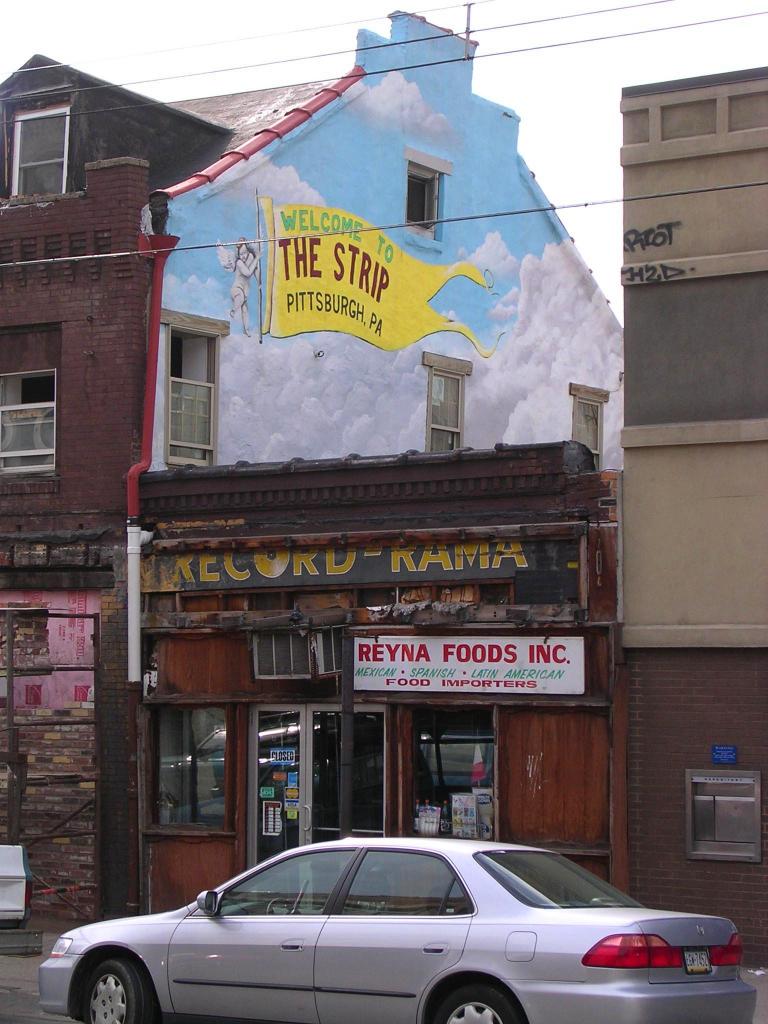
picture of the welcome to the strip mural On Penn Avenue, between 21st and 20th, there's a mural on the second floor of the side of a bar that says "Welcome to the Strip." The mural is right in the heart of the strip, a stone's throw from the best of the produce markets and restaurants in the area. From the picture, you might think that the buildings around the mural are about to fall down, but I can tell you they've looked about the same for years now.

The strip is a bazaar in the true old-world sense: merchants from a mishmash of cultures offering their wares in the simplest way possible. There's no yuppy light fixtures or froufrou furniture (well, ok, there's some at the froufrou furniture store) to create a "shopping experience." In other words, you see what you get, you get what you pay for, and if you don't like the price, you negotiate. Back in the day, 61C's office was in the strip, and we'd usually make time to grab lunch from one of the local places (the neighborhood had Vietnamese, Italian, Caribbean, and Japanese food, with Thai, Indian, and a brew pub close by). By the way, the strip has an ultra-hip and flashy web site which totally fails to convey the feel of the place (in fact, it seems to focus on only the yuppiest aspects).

And of course, click on the picture for a larger version of the mural.

June 04, 2004

Lawrenceville alive!

picture of lawrenceville alive mural On Butler St. in Pittsburgh's Lawrenceville neighborhood, there's a mural that states, definitively (note the double exclamation points), that Lawrenceville is alive. And strangely enough, the mural is correct. Lawrenceville, after years of depression after the steel mills left, has become the new happening spot in town (at least if you're a hipster). But where hipsters tread, normal people soon follow (if only for the ironic t-shirts and art galleries), and slowly but surely the shops along the piece of Butler St. near the Strip District are being renovated.

On the stretch of Butler where this mural is found, there's a car wash, a field of oil tanks, and a bunch of depressed-looking houses (it must be hard to keep the house looking good when you live across the street from a bunch of soul-sucking oil tanks). The hard part for me is figuring out whether the people who painted the mural were trying to inspire the crappy part of Lawrenceville to improve itself, or they were saying to people passing through "sure it's bad here, but another mile down the road the joint is hopping!"

(Click on the image for a larger version of the picture.)